
Support teams rarely lose time because they cannot write. They lose time because they have to keep re-finding the same text.
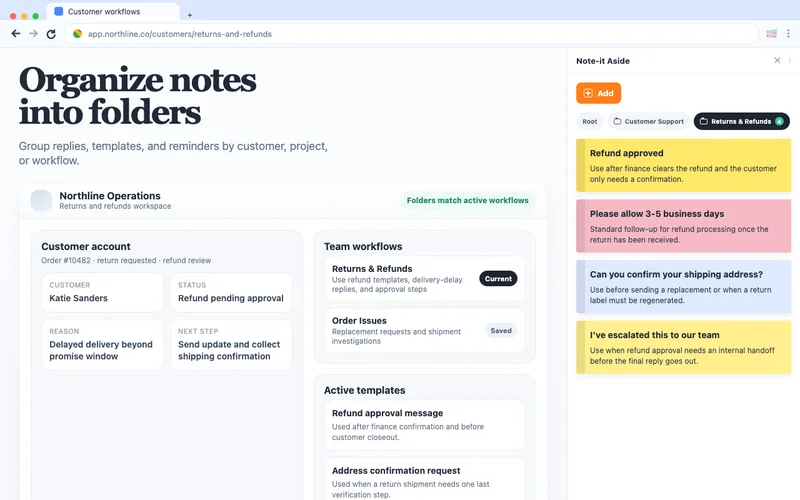
Shipping delay wording, verification requests, refund language, escalation notes, and follow-up replies all tend to live in too many places:
- old tickets
- internal docs
- pinned chat messages
- personal notes
That fragmentation is where browser-side notes become useful.
Keep the queue and the reply next to each other
The strongest setup is simple:
- keep the support tool open on the left
- keep your saved notes and snippets in the side panel
- group them by workflow instead of by person
That structure keeps the queue readable and keeps the answers close.
What should go into folders first
Start with the categories that already repeat every day:
- shipping delays and tracking updates
- returns and refund language
- account verification requests
- escalation handoffs
- follow-up reminders for unresolved cases
Folders work well here because they match how support teams already think. They do not need a complicated system. They need the right cluster of replies at the right moment.
Why visible snippets beat hidden references
In support, visible context matters.
When the side panel stays open, agents can:
- scan the saved wording before they reply
- compare multiple approved options quickly
- keep brief case notes beside the conversation
- avoid switching away from the ticket to search another document
That is a small change in interface, but a meaningful change in pace.
A good starting rule
Do not try to save everything on day one. Start with the phrases your team already reuses every shift. If a line gets typed, pasted, or searched more than once a day, it probably belongs in the side panel.
That creates a workflow library gradually, without forcing a big migration project.
Side panel during the ticket
The strongest measured behavior for this product is the small one: keep the ticket open, hover the side panel, copy the closest approved reply, then adapt the details. That keeps the agent inside the queue instead of sending them to a doc search.
Templates for this workflow
Start with the customer support template gallery. Two useful first saves are Shipping delay reply and Refund confirmation.
Thanks for writing about order #12345. The shipment is still in transit, and we expect the next update by the expected update date.
I have submitted the refund for invoice INV-12345. The update should appear by the refund update date.
Proof from the Chrome Web Store
“I do a LOT of copy/pasting and it is SO convenient to have all my notes right there. No switching tabs, or opening apps on another page.”
— Public Chrome Web Store review, English
Where to go next
For ready-to-adapt wording, try 12 canned responses for live chat and email, with paired examples and a worked copy-and-edit routine.
For the broader role setup, use the customer support workflow page. If you work beside a CRM, compare Quick Text, Macros, and browser-side notes in the CRM customer-service snippet guide. If your queue overlaps with store operations, read the e-commerce admin workflow; if the team is comparing tools, use the Text Blaze alternative guide.
Try it beside your next tab
Install Note-it Aside, open the side panel, and select the folder that matches this workflow.