
Some forms feel familiar before you even open them: the pickup request with the same company details, the internal request with the same contact information. Your saved notes already hold the text. The repeated part is putting each note into its field.
Note-it Aside 1.7.0 adds Copy-Paste Record & Replay: save those steps once, then run them again using your notes’ current text. It also brings optional role-based starter templates for new installs and an optional Premium plan for unlimited saved recordings.
Your existing free features stay free. One saved recording is free too.
A pickup request, without starting over
Imagine a recurring carrier pickup form with company, contact and address fields. Keep those details in separate notes beside the page. This is an illustrative example, not an integration with a shipping service.
- Open the form and Note-it Aside’s side panel. Allow access to this tab if asked.
- Press Record before copying and pasting the steps you want to save.
- Copy each relevant note from the side panel and paste it into its form field.
- Press Stop. Keep or change the suggested name, such as “pickup · Schedule a carrier pickup”, then press Save before leaving the tab.
- Next time, open the dropdown beside Record, choose the recording and press Replay. Review the results, then submit the form yourself.
Change your saved address note, and the next Replay inserts the updated address. Template notes use their current values too. The recording links notes to fields; it does not keep an old copy of everything you pasted or look up customer information for you.
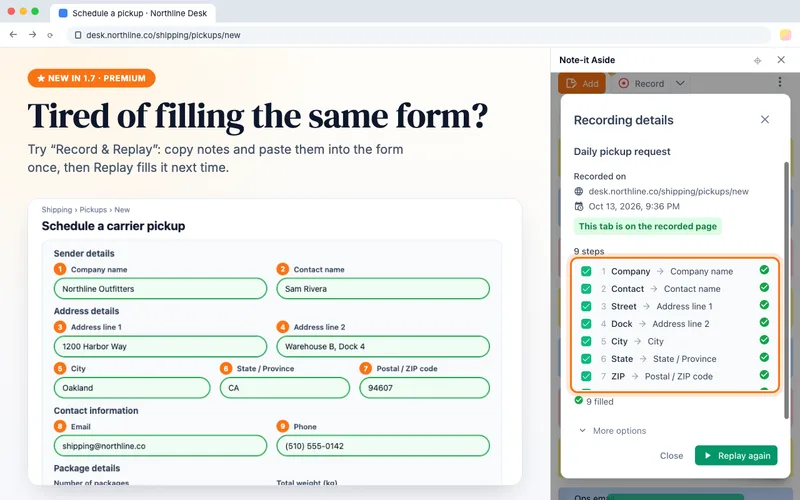
An illustrative pickup form. The screenshot highlights Premium; the free plan lets you keep one saved recording.
Playing this video loads YouTube. Watch on YouTube
What it fills—and what it leaves to you
Replay works with supported text inputs, text areas and compatible rich-text form editors. It fills matching empty fields and leaves existing text alone. The result tells you what was filled or skipped, including fields not found, text not accepted and missing notes.
Only pastes of notes copied from the side panel become recorded steps. Typing, right-click inserts, other clipboard content, clicks, dropdown selections, radio buttons and checkboxes are not recorded. It is a single-page routine, not a multi-page macro. Cross-site embedded forms, closed shadow roots and restricted browser or store pages have limits.
Finish with Stop → Save before leaving: changing tabs, navigating away or closing the panel discards an unfinished recording. Replay does not run on page load or submit anything for you.
A useful starting point for your role
New installs can answer optional welcome questions to get one folder of five editable templates for customer service, sales, e-commerce or IT support. Think of an acknowledgment reply, a sales follow-up, an order update or troubleshooting instructions: starting points you can rewrite for your work, not answers to send without checking.
You can skip the questions. Choosing Other or Rather not say also leaves you with the welcome notes, without a role folder. Updating an existing installation does not launch this survey.
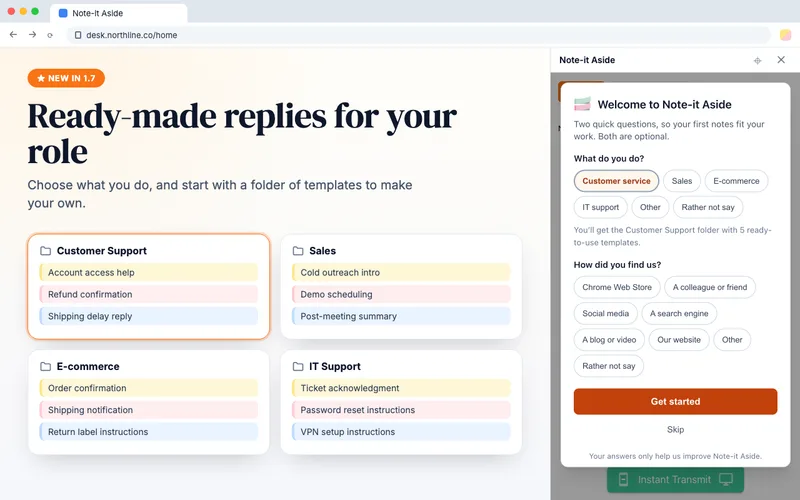
Optional starters for a new install; all five templates are editable.
Already using Note-it Aside? Browse the existing gallery for customer support, sales, e-commerce or IT support. Adapt the wording you need; our snippet-saving guide covers the everyday basics.
What stays free, and what Premium adds
| Free | Premium | |
|---|---|---|
| Notes, folders and templates | Included | Included |
| Cloud backup, sharing, Instant Transmit and import/export | Included | Included |
| Saved recordings | One at a time | Unlimited |
Delete your usable free recording to make room for another. Unlimited saved recordings are the only Premium feature in 1.7.0; you do not need a subscription to keep using the tools you already have.
Eligible new customers can try Premium free for 14 days, then pay US$2.99 per month plus applicable taxes unless cancelled. There is one trial per customer, with payment-method eligibility also checked. Open Unlock Premium in the side panel to see the offer. Stripe hosts checkout and subscription management; you can cancel there. The seller is extension.rocks. See the Terms of Sale before subscribing.
If Premium ends, one recording remains usable: the most recently replayed, or the oldest if none has been replayed. Your extra recordings stay saved, and unlock again with Premium. While locked, they cannot be replayed, edited or deleted in 1.7.0. Notes and other free features are unaffected.
Premium follows your signed-in, synced browser profile, up to five browsers, with occasional online verification. It is not an email-based account or automatic linking between unrelated Chrome and Edge profiles.
A few smaller improvements
- Recordings join optional Google Drive/Dropbox backup and export/import. Backup merges changes and lets you choose between conflicting versions.
- Panel text, dates and new starter notes follow language choices more consistently. Untouched new starters can follow a panel-language change; edited notes and renamed folders stay yours.
- Coordinated saving and importing better protect note and folder changes across multiple panels.
- Rate & Feedback is easier to find. Store titles now lead with Quick Copy; the product is still Note-it Aside.
“Recording” means steps, not your screen
There is no audio, video or screen capture. Saved steps contain note references and field fingerprints rather than snapshots of pasted values; notes still hold the text you save. You grant page access one tab at a time. Version 1.7.0 adds no manifest permissions over 1.6.3.
Notes and recordings stay local by default. Optional cloud backup sends them to your chosen account. Folder sharing and Instant Transmit have their own optional transfers; shared folders do not include recordings. Usage analytics and technical diagnostics also exist. The privacy policy explains the details.
Try one routine
Already installed? Open the panel and save one form you fill regularly. New here? Install free in desktop Chrome or Microsoft Edge, or start by browsing the template gallery. One useful routine is enough to begin.